 正版资源
高性能文件管理工具Bloom 1.5.38 MacOS
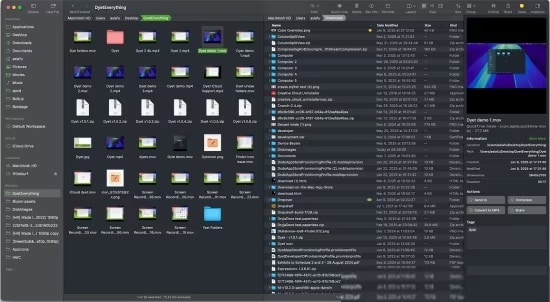
Bloom 1.5.38 是一款面向 macOS 的文件管理工具(兼容 macOS 14+,安装包 15.4 MB),定位是替代或增强系统自带的 Finder。放到音乐制作场景里,它处理的是每个工程背后那些具体的文件:散落在移动硬盘里的采样库、按日期堆叠的工程备份、导出后忘了重命名的成品、客户发来的
网盘链接 · 支付成功后自动发货
永久有效 · 链接失效免费补发
每日 9:00-21:00 在线客服
Bloom 1.5.38 是一款面向 macOS 的文件管理工具(兼容 macOS 14+,安装包 15.4 MB),定位是替代或增强系统自带的 Finder。放到音乐制作场景里,它处理的是每个工程背后那些具体的文件:散落在移动硬盘里的采样库、按日期堆叠的工程备份、导出后忘了重命名的成品、客户发来的整包素材。这些内容的共同问题是数量大、命名乱、分布在不同位置,而 Finder 处理这些事并不算高效。
⌘⇧⏎ 全局跳转,以及只在指定位置生效的关键词搜索
Bloom 把「前往文件夹」做成了系统级操作,用 ⌘⇧⏎ 在任意界面呼出,输入路径就能直达目标目录,不必先点开 Finder 窗口再一层层翻。对经常在工程目录、采样库、导出文件夹之间来回跳的人来说,直接输入路径比用鼠标逐层点开更省事。
搜索面板同时支持路径导航和关键词搜索。需要注意它的搜索逻辑:输入关键词时,Bloom 只在你预先设定的位置范围内检索。这对制作人其实是好事:把范围锁定在采样库根目录,就不会把系统缓存、插件资源、其他磁盘的杂项一起扫进来,结果更干净。反过来说,第一次使用时先把常用位置设好,这个功能才有意义。
多窗口、标签和压缩包预览在工程里的实际位置
- 多窗口:一个窗口固定在当前工程目录,另一个挂在采样库或参考曲目文件夹,拖拽取用,不用反复切换标签页。
- 标签操作:给鼓组、loop、人声切片、效果音效打上不同标签,跨目录归类,找素材时按标签聚合,而不是靠记忆路径。
- 压缩包预览:客户交付包或下载的采样包,先不解压查看内部结构,确认是不是你要的那一版,避免解压出一堆无用文件再清理。
- 智能归档:导出成品、混音版本、分轨可以按规则归位,减少「最终版_最终版_2」这类堆积。
需要说清楚的是,Bloom 工作在文件系统这一层,不参与音频处理,也不会改变宿主软件内部的素材浏览器。它的价值在于减少「找文件」这件事的耗时。15.4 MB 的体积很轻,兼容 macOS 14+,可以先在采样库这类小范围里试用,确认顺手再考虑替换掉日常的 Finder 习惯。
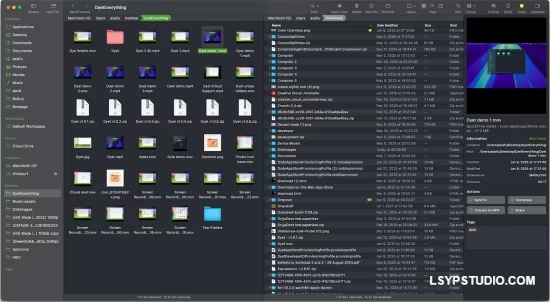
Bloom是一款专为 macOS 设计的现代化、高性能文件管理工具,旨在替代或增强原生 Finder。它支持极速搜索、智能归档、压缩文件预览、多窗口管理及标签操作,以视觉化、智能化的界面提升文件管理效率,特别适合需要高效处理复杂文件系统的用户,兼容 macOS 14+
File Size: 15.4 MB
Refined Finder Experience, Reimagined for Productivity. The finest replacement for Finder with powerful tools to streamline your workflow, enhance productivity, and keep everything organized at your fingertips.
Better Search Experience
Bloom brings “Go to Folder” system-wide with an intuitive shortcut ⌘⇧⏎, so you can navigate to any location instantly, from anywhere.
Search Files by Keyword
Actually the panel supports both path navigation and keyword search. When you enter keywords, Bloom searches exclusively within your predefined locations (by default, ~). It can scan tens of thousands of files in seconds, delivering lightning-fast results.
Search Where You Work
With Bloom, you can search right where you are—just press ⌘F in any folder and start typing. The search is live, so any changes you make to the file system appear instantly. You can also use ⌘R to manually refresh the search results.
Portal
Portal is a compact Bloom window without the sidebar or preview. Though it looks small, it offers all the core features of a standard window. Use it to open your working directory or as a temporary transfer station. You can pin it on top of other windows, and when dragged to the edge of the screen, it will automatically collapse into the edge.
View Archives
Bloom supports viewing archive contents without extracting them. You can browse the compressed file structure in the inspector, just like a regular file preview. For text/image/PDF entries under 10MB, you can even press «Space» or double-click to open them directly.
Sync Browsing
After enabling this in the toolbar, as you navigate through the folder list on the left panel, the contents of the selected directory are automatically displayed in the right panel. This makes it easier to browse your files without switching context.
Column Auto Resize
Bloom is dedicated to optimizing the file-browsing experience, and this takes it to the next level. With Auto Resize enabled, you no longer need to tweak the name column or adjust the column width in column view to see full file names.
Why Settle for White and Gray?
Tired of Finder’s one-size-fits-all gray or white? In Bloom, you are the one who sets the tone. Pick your favorite color and Bloom will style the interface to match it beautifully, keeping everything balanced and cohesive.
And More…
Homepage
同类资源
与当前资源同分类推荐 音频工具
World Colors Pipa 中国民乐琵琶音色
永久有效 · 网盘发货
 音频工具
Liikkuva v1.1北欧斯堪的纳维亚弦乐音源 配乐编曲Texture音色库
永久有效 · 网盘发货
 音频工具
键盘音色合集 Arturia Analog Lab V Pro v5.12.6-L O S T [MacOSX]
永久有效 · 网盘发货
 音频工具
预设文件合集 STL Tones Kemper Profiles KiPR Collection v2025.2
永久有效 · 网盘发货
 音频工具
动态范围增强器 Techivation M-Loudener v1.1.0 MOCHA Win
永久有效 · 网盘发货