 正版资源
gSyncit for Microsoft Outlook 5.8.50
gSyncit for Microsoft Outlook 5.8.50 是一款把 Outlook 与外部账户打通的同步工具。它不处理声音,处理的是排期与交付那一层:把 Outlook 里的日历、任务、联系人、便签,与 Google、Toodledo、Todoist、Pocket Informant
网盘链接 · 支付成功后自动发货
永久有效 · 链接失效免费补发
每日 9:00-21:00 在线客服
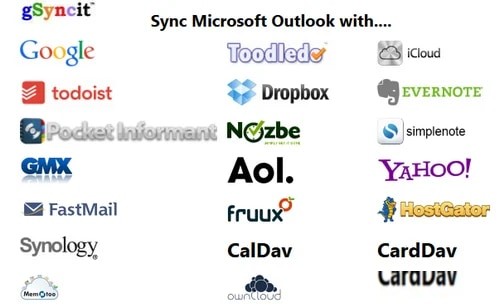
gSyncit for Microsoft Outlook 5.8.50 是一款把 Outlook 与外部账户打通的同步工具。它不处理声音,处理的是排期与交付那一层:把 Outlook 里的日历、任务、联系人、便签,与 Google、Toodledo、Todoist、Pocket Informant Online、Evernote、Simplenote、Nozbe 等账户对齐,也支持与 iCloud、AOL、Yahoo! 以及其他走 CardDAV、CalDAV 的服务同步日历和联系人。对同时接配乐、广告短版和混音单子的人来说,客户在哪个平台发会议邀请,不该决定你把交稿日记在哪里。
Outlook 日历、任务与外部账户的同步
它提供两条路径:自动同步,以及手动绑定账号后针对日历和任务做同步。前者适合长期并行的双日历状态——工作室排期留在 Outlook,客户共享的档期表留在 Google,改一边另一边跟着变,不用每天开两个窗口手工对表;后者适合临时接入:一个新客户、一个项目周期,绑完账号同步一轮就收手,不把私人日程卷进去。任务同步对配乐工作尤其实际,交稿节点、混音修改轮次、素材回收这类条目通常记在任务里而不是日历里,同步之后手机上也能勾掉。联系人同步则让客户、录音师、混音师的联系方式在两端保持一致。
v5 的三处变化:同步速度、事件附件、域联系人
版本 5 的改动集中在三件事上。一是同步性能提升,与 Google 及其他受支持服务的同步更快,日历条目多的账户感受最明显。二是 Google 日历附件:Outlook 事件与 Google 事件之间的附件可以同步,把参考音频、分轨说明、混音备注挂在会议事件上,两端都能取到。三是 Google Apps 域联系人,可以把域内的全局地址列表同步到 Outlook,团队协作时不必再手工导入一份通讯录。安装包 23.47 MB,界面为英文。
放进工作流时有几点值得留意。它只做数据层面的同步,不碰音频文件本身,所以别把工程目录当成同步对象,附件同步也建议只放小体积的参考文件。第一次使用时先拿一个测试日历跑一轮,确认字段对应和重复条目符合预期,再放开自动同步。英文界面意味着菜单和选项要先熟悉一遍,尤其是账号绑定与同步范围的部分。适合已经用 Outlook 管排期、但客户和协作方习惯用 Google 日历或其他 CardDAV、CalDAV 服务的制作人。
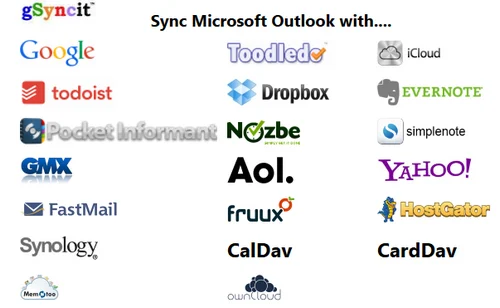
gsyncit for microsoft outlook主要用于outlook和Google Calendar的同步,支持自动同步和手动绑定账号进行日历和任务的同步操作
Languages: English | File Size: 23.47 MB
gSyncit enables syncing Outlook calendars, contacts, notes, and tasks with your Google, Toodledo, Todoist, Pocket Informant Online, Evernote, Simplenote, Nozbe accounts. It also supports syncing Calendars and Contacts with iCloud, AOL, Yahoo! many other services that support CardDav and CalDav access.
What’s New in gSyncit 5:
Improved Sync Performance:
Faster sync with Google and other supported services.
Google Calendar Attachments:
Sync attachments between Outlook and Google events.
Google Contact Domain Contact:
Sync Google Apps Domain Global Address List with Outlook contacts.
CalDav Keyword Filtering:
Filter CalDav events using keyword filtering options.
Informant Online Attendees:
Sync attendees between Outlook and Informant Online.
Todoist Sync:
Basic task sync with Todoist (requires Todoist premium account).
Product Features:
– Use gSyncit to sync Outlook with mobile/table devices or another Outlook installation.
– Sync with Google account calendars, contacts, tasks and notes.
– Sync with Toodledo, Todoist, Pocket Informant, Evernote, Simplenote, DropBox, and Nozbe
– Sync with CalDav and CardDav services like iCloud, AOL, Yahoo, and Memotoo
– Syncing calendar attachments with Google and CalDav events
– Duplicate removal wizard for finding & removing duplicates in Outlook folders.
– ONE and TWO WAY syncing of Outlook calendars, contacts, notes and tasks.
– Sync Outlook categories with Google calendar event colors.
– Sync with multiple Outlook profiles and service accounts (e.g. multiple Google accounts).
– Automatically matches entries to avoid duplicate items when syncing.
– Customize sync options to control how, when and what you want to sync.
– Keyword and Outlook category filters to control the Outlook content you want to sync.
– Advanced options to sync Outlook items based on categories.
Feature Highlights in gSyncit 5:
GOOGLE EVENT ATTACHMENTS:
Sync Google/Outlook event attachments.
GOOGLE DOMAIN CONTACT SYNC:
Sync Google Domain contact list to Outlook (including photos).
TODOIST SYNC:
Basic sync support between Todoist and Outlook
CALDAV KEYWORD FILTERING:
Advanced event keyword filtering for CalDav and Google events.
CALDAV DEFAULTS:
Ability to assign default availability/visibility when syncing with CalDav services.
GOOGLE EVENT COLOR SUPPORT:
Added ability to sync Google event colors with Outlook categories.
TWO-WAY NOTE SYNC WITH GMAIL:
Sync Outlook notes to a Gmail mailbox for two-way note syncing between Outlook and Gmail notes.
GOOGLE ACCOUNT OPEN AUTHENTICATION SUPPORT:
Updated all Google syncing operations to use Open Authentication for improved security.
CONTACT DISTRIBUTION LIST SYNC:
Sync Outlook distribution lists with Google groups.
ADVANCED KEYWORD FILTERS:
Updated keywork filtering to support combinding criteria like starts with, contains, ends with and equals.
TODOIST SYNC:
Support for syncing Outlook tasks with Todoist task lists.
CALDAV & CARDDAV SUPPORT:
Support syncing with CalDav and CardDav for exchange of calendar, contact and task information with with iCloud, AOL, Fruxx, Yahoo, Memotoo and many other “DAV” enabled services. Also includes support for syncing attachments for calendar events.
Product Requirements:
– Microsoft .Net Framework 4.0 or higher
– Internet Explorer 11, Microsoft Edge, Google Chrome or Firebox
– Microsoft Vista / Windows 7 / Windows 8 / Windows 10
– Microsoft Outlook 2007, 2010, 2013, 2016, 2019 & Office 365 (Desktop Client)
NOTE:
64-bit version requires Outlook 2010/2013/2016 64-bit and not just Windows 64-bit. Otherwise, install the 32-bit version of gSyncit including if using Windows 64-bit. You can confirm the “bit” version of Outlook used on Outlook File / Help or File / Accounts panel.
Homepage
同类资源
与当前资源同分类推荐 音频工具
World Colors Pipa 中国民乐琵琶音色
永久有效 · 网盘发货
 音频工具
Liikkuva v1.1北欧斯堪的纳维亚弦乐音源 配乐编曲Texture音色库
永久有效 · 网盘发货
 音频工具
键盘音色合集 Arturia Analog Lab V Pro v5.12.6-L O S T [MacOSX]
永久有效 · 网盘发货
 音频工具
预设文件合集 STL Tones Kemper Profiles KiPR Collection v2025.2
永久有效 · 网盘发货
 音频工具
动态范围增强器 Techivation M-Loudener v1.1.0 MOCHA Win
永久有效 · 网盘发货