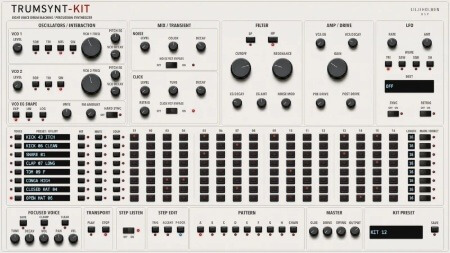
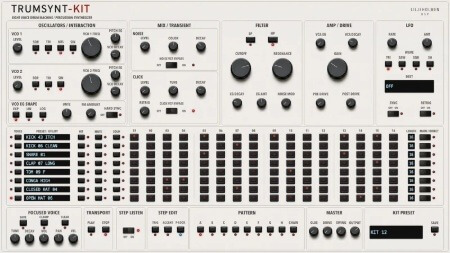
TRUMSYNT-16 是 Liljeholmen DSP 的打击乐合成器,当前 Windows 版本为 v1.4.1,体积很小。它的结构很明确:每个插件实例只产出一个打击乐音色,但这个音色自带四条独立的音序器轨道,每条最多 16 个步进。这意味着你调好一个底鼓、一个金属打击或一段噪声瞬态之后,可以直接在插件内部把它排成节奏型,不必再挂采样器或鼓机去承接这一层。
四条 16 步轨道:一个实例写一层节奏
把音色设计和节奏编排放在同一个窗口里,是它最实用的地方。做 techno、electro、IDM 或配乐里的机械打击层时,你可以先拧出音头,再立刻用四条轨道试错:一条走主重音,一条走偏置的弱拍,一条做装饰性的短促点击,剩下一条留给需要错位的细节。16 步的长度适合稳定的四拍循环,也适合做成两小节一循环的短句。
放进工程时要注意两点。第一,一个实例只有一个音色,做完整鼓组需要开多个实例,请提前规划轨道命名和总线,否则工程很快会变乱;同时留意多实例叠加后的 CPU 占用。第二,音序器有自己的运行方式,RUN 模式下走插件自身时钟,也可以跟随宿主,做需要与工程严格对齐的段落时先确认它跟的是谁。
LFO SYNC 与九个调制目标:给合成打击加内部运动
v1.4 新增了九个 LFO 目标:CLICK TUNE、NOISE DEC、CLICK DEC、VEL、PITCH、VCO1 LVL、VCO2 LVL、VCO1 PITCH EG 和 VCO2 PITCH EG。其中 PITCH 会在声音持续期间同时移动两个振荡器,深度与 VCO1 PITCH、VCO2 PITCH 一致,而咔嗒声保持自己的音调——做整条打击的下坠或上扬时,瞬态不会被一起拖走。VEL 则在演奏时改变每个打击的力度,音量、咔嗒声和力度驱动的 VCF 衰减会随之变化,适合做重音层次和轻微的人性化波动。MOD A 与 MOD B 现在也能指向 VCO1 LVL、VCO2 LVL 和两个 PITCH EG,调制路径比之前宽。
LFO SYNC 现在与音符同步,RATE 依次对应 4 小节、2 小节、1 小节、1/2、1/4、1/8、1/16 和 1/32,LFO 会锁定到小节:播放时锁 DAW 位置,RUN 模式下锁音序器自身时钟。使用时记住,开启 SYNC 后 RATE 是音符值而不是自由速率,想要慢速漂移或非量化摆动就得关掉它;另外,开启 SYNC 保存的预设会保留其 RATE 值,换工程时值得复查一遍。
v1.4.1 主要提升了 Windows 下的稳定性并修掉一些内部小问题。试用期为 14 天,期间每分钟静音 5 秒,到期后需安装许可证才会发声。建议先在真实工程里跑多实例和 SYNC 锁定,确认时钟行为符合你的工作流,再决定是否把它写进模板。
Team R2R | 11 October 2026 | 6.12 MB
每个实例一个打击乐合成器音色,具有四个独立的音序器轨道,最多可设置 16 个步进。
v1.4.1 – 提升了 Windows 系统的稳定性并修复了一些内部小问题。v1.4 – 试用期延长至 14 天,从第一天起每分钟静音 5 秒;14 天后,插件将不再发出声音,直到安装许可证。许可证会移除 TRUMSYNT-16 和 TRUMSYNT-KIT 中的插件。任何试用过早期版本的用户,在首次打开 1.4 版本时都会获得全新的 14 天试用期。- 新增九个 LFO 目标:CLICK TUNE、NOISE DEC、CLICK DEC、VEL、PITCH、VCO1 LVL、VCO2 LVL、VCO1 PITCH EG 和 VCO2 PITCH EG。PITCH 会在声音持续期间同时移动两个振荡器,其深度与 VCO1 PITCH 和 VCO2 PITCH 相同;咔嗒声保持其自身的音调。VEL 会在演奏时调整每个打击乐的力度,因此音量、咔嗒声和力度驱动的 VCF 衰减都会随之变化。- MOD A 和 MOD B 现在也可以控制 VCO1 LVL、VCO2 LVL、VCO1 PITCH EG 和VCO2 PITCH EG。- LFO SYNC 现在与音符同步。RATE 会依次调整八个音符值(4 小节、2 小节、1 小节、1/2、1/4、1/8、1/16 和 1/32),LFO 会锁定到小节:播放时锁定到 DAW 的位置,在 RUN 模式下锁定到音序器自身的时钟。开启 SYNC 保存的预设会保留其 RATE 值(读取为最近的音符值),但现在会与音符同步。-开启 RETRIG 的 SH 会在每次击打时从音序器或 MIDI 获取一个新的随机值,而不是保持一个值。结合 VEL,这使得每次击打都有其随机力度。-开启 RESONANCE 时不再发出噼啪声。- 撤销:Cmd+Z(Windows 系统下为 Ctrl+Z)可撤销编辑器中的最后一次编辑,最多可撤销 100 次:包括旋钮的整个移动、按钮的按下、菜单选项的选择、粘贴的值、预设加载或初始化操作。宿主自动化和 RUN/STOP 操作不包含在内。-复制和粘贴音序器值:将鼠标指针指向一个步进旋钮并按 Cmd/Ctrl+C,然后将鼠标指针指向另一个旋钮并按 Cmd/Ctrl+V。PITCH 值粘贴到 PITCH 值,VELOCITY 值粘贴到 VELOCITY 值,MOD A 和 MOD B 值可以互相粘贴。-数值读取:按 V 键可开启或关闭此功能。开启后,按住的旋钮会显示其数值,同步的 LFO RATE 值会显示为音符值。此设置保存在项目中,而不是预设中。- DAW 自身的参数字段和自动化轨道现在以单位显示数值,格式与数值读数相同:1.5 kHz、50 ms、+3.0 st、72%、x1.50,以及音符值,例如同步 LFO 速率的 1/4。在 DAW 中输入的数值将以其显示的单位读取,因此衰减中的 50 表示 50 毫秒,幅度中的 72 表示 72%;也可以输入单位,例如1.5 kHz 或 0.5 s。非数值文本将保持参数不变。
One percussion synth voice per instance, with four independent sequencer lanes and up to 16 steps.
v1.4.1
– Stability improvements for Windows and minor internal fixes.
v1.4
– The trial is now 14 days, with 5 seconds of silence every minute from the
first day; after 14 days the plug-in makes no sound until a license is
installed. A license removes both, in TRUMSYNT-16 and TRUMSYNT-KIT. Anyone
who tried an earlier version gets a fresh 14-day trial the first time 1.4
opens.
– Nine new LFO destinations: CLICK TUNE, NOISE DEC, CLICK DEC, VEL, PITCH,
VCO1 LVL, VCO2 LVL, VCO1 PITCH EG and VCO2 PITCH EG. PITCH moves both
oscillators together while the sound rings, with the same depth as VCO1
PITCH and VCO2 PITCH; the click keeps its own tuning. VEL scales each hit’s
velocity as it plays, so level, click and the velocity-driven VCF decay all
follow it.
– MOD A and MOD B can now also reach VCO1 LVL, VCO2 LVL, VCO1 PITCH EG and
VCO2 PITCH EG.
– LFO SYNC now plays in time. RATE steps through eight note values (4 bars,
2 bars, 1 bar, 1/2, 1/4, 1/8, 1/16 and 1/32) and the LFO is locked to the
bar: to the DAW’s position while it plays, and to the sequencer’s own clock
under RUN. Presets saved with SYNC on keep their RATE, read as the nearest
note value, but now sound in time.
– SH with RETRIG on takes a new random value at every hit, from the sequencer
or MIDI, instead of holding one value. Together with VEL this gives every hit
its own random velocity.
– Turning RESONANCE no longer crackles on a ringing sound.
– Undo: Cmd+Z (Ctrl+Z on Windows) undoes the last edit made in the editor, up
to 100 edits: a whole knob movement, a button, a menu choice, a pasted value,
a preset load or INIT. Host automation and RUN/STOP are not part of it.
– Copy and paste sequencer values: point at a step knob and press Cmd/Ctrl+C,
then point at another and press Cmd/Ctrl+V. PITCH pastes to PITCH, VELOCITY
to VELOCITY, and MOD A and MOD B between each other.
– Value readout: press V to switch it on or off. While it is on, a knob you
hold shows its value, and a synced LFO RATE reads as a note value. The
setting is saved with the project, not in presets.
– The DAW’s own parameter fields and automation lanes now show values in
their units, in the same words as the value readout: 1.5 kHz, 50 ms,
+3.0 st, 72 %, x1.50, and a note value such as 1/4 for a synced LFO RATE.
A value typed into the DAW is read in the unit it is shown in, so 50 in a
decay is 50 ms and 72 in an amount is 72 %; a unit can be typed too, as in
1.5 kHz or 0.5 s. Text that is not a value leaves the parameter as it was.
Projects, presets and automation keep their values.
– New look for the lit LEDs, the popup menus and the preset browser, and the
knob indicators now line up with the panel art.
– Presets and projects saved with earlier versions keep their LFO and MOD
destinations.
 正版资源
 打击乐
 打击乐
 打击乐
 打击乐
 打击乐