 正版资源
DiscoDSP TED-8 v1.3.2 [WiN]
TED-8 v1.3.2 是 Oberheim TEO-5 的插件版本,WiN 平台可用。它在制作里的位置很明确:一方面把 TEO-5 的声音搬进 DAW,另一方面通过一根连接真实设备的线缆,充当桌面上 TEO-5 的编辑器和音色库管理器。对没有这台硬件、或者有硬件但想在工程里统一管理音色的制作人,
网盘链接 · 支付成功后自动发货
永久有效 · 链接失效免费补发
每日 9:00-21:00 在线客服
TED-8 v1.3.2 是 Oberheim TEO-5 的插件版本,WiN 平台可用。它在制作里的位置很明确:一方面把 TEO-5 的声音搬进 DAW,另一方面通过一根连接真实设备的线缆,充当桌面上 TEO-5 的编辑器和音色库管理器。对没有这台硬件、或者有硬件但想在工程里统一管理音色的制作人,这两件事都很实用。
逐旋钮测出来的 SEM 滤波器与包络曲线
TED-8 的建模依据是实测录音,而不是数据手册。建模时把一台 TEO-5 摆在工作台上,一次只弹一个音符、只拧一个旋钮,记录滤波器每一步的移动幅度、包络线的形状、每个 LFO 设置的实际速度,以及每个效果器对声音的着色。所以你在插件里推滤波器和拉包络时,得到的响应和硬件一致,而不是“接近”。
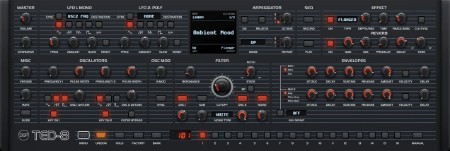
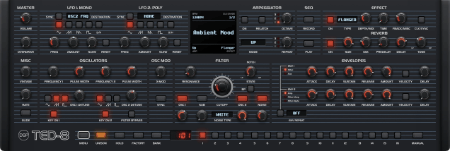
面板功能是齐的:两个振荡器(带低频与噪声)、SEM 式滤波器、两个包络、两个 LFO、滑音、齐奏、琶音器、步进音序器、过载、效果器和混响。做合成器流行、disco 与 funk 的和弦 stab、氛围 pad,或者配乐里的持续音色,都可以直接在它上面调。
它还保留了硬件的细微瑕疵:各个音色之间相差几个音分,音量也略有不同。叠和弦时这一点很关键,声音是自然铺开的,不是僵硬复制。放进工程时,如果你要极干净的电子音色,可能需要靠调制或后期收一收;如果要的是老合成器那种厚度,这层偏差正是它值钱的地方。
复音齐奏、MPE 与 TEO-5 硬件程序互通
插件侧加了几样硬件上没有的东西:MPE 支持、MTS-ESP 微调,以及一个复音齐奏模式——在 8 个音符上最多叠加 6 个复音,同时 48 个复音。做厚实的多层铺底,或者需要微分音的音景时,这几项比单纯还原更有用。完整的调制矩阵则决定了它能不能当主力合成器用,而不只是音色复刻。
另一条线是互通:TED-8 使用 TEO-5 自身的 MIDI CC 编号,并读取、写入它的程序。也就是说,你在插件里调出的音色可以
Team R2R | 26 October 2026 | 53.04 MB
TED-8 是一款 Oberheim TEO-5 的插件,基于对真实设备的数千次测量数据构建而成。我们记录、比较并调整每一个旋钮、每一条曲线和每一个效果,直到插件和硬件的声音完全一致。
之后,我们为其添加了三个复音、MPE、MTS-ESP 微调、一个可在 8 个音符上叠加最多 6 个复音(同时 48 个复音)的复音齐奏模式、一个完整的调制矩阵,以及一根连接真实设备的线缆。因此,TED-8 既可以在您的 DAW 中独立运行,也可以作为您桌面上 TEO-5 的编辑器和音色库管理器。
我们的建模过程:
我们首先在工作台上摆放了一台 TEO-5,并投入了大量的耐心。我们一次只调整一个音符,一次只调整一个旋钮,记录下设备的实际运行情况:滤波器每步的移动幅度、包络线的曲线、每个 LFO 设置的运行速度以及每个效果器对声音的着色。 TED-8 遵循的是录音而非数据手册,因此您设置的音色感觉和响应与硬件上的效果完全一致。
一些细微的瑕疵也得以保留。每个音色之间都相差几个音分,音量也略有不同,就像 TEO-5 的音色一样,因此和弦听起来自然流畅,而非生硬的复制品。
完全复刻:
TEO-5 前面板上的所有功能都一应俱全,并且工作方式也符合预期:两个带低频和噪声的振荡器、SEM 式滤波器、两个包络、两个低频振荡器、滑音、齐奏、琶音器、步进音序器、过载、效果器和混响。TED-8 使用 TEO-5 自身的 MIDI CC 编号,并读取和写入其程序,因此您在插件中创建的声音硬件可以播放,反之亦然。
这款插件的功能远不止于此:它支持 8 个复音(而非 5 个),复音齐奏最多可达 48 个复音,屏幕上还显示一个 16 槽调制矩阵。
连接您的 TEO-5
:如果您拥有 TEO-5,只需通过 USB 连接,TED-8 即可自动识别。转动 TEO-5 上的旋钮,插件也会随之调整;移动插件中的控制项,TEO-5 也会做出相应响应。程序更改始终保持同步,您在两侧录制的音序都会导入到同一个程序中,您还可以将所有 256 个用户程序备份到一个文件中,以便日后恢复。TED
-8 完全兼容 TEO-5 的 SysEx:为 TEO-5 创建的 .syx 音色库可以直接加载到插件中,插件音色也会导出为 .syx 格式供硬件使用。了解如何加载 TEO-5 音色。
只需轻点几下鼠标,即可将原本繁琐的菜单操作简化为简单的设置,让您的硬件音色最终融入到您的项目中。
主音量、低频振荡器
音量和过载控制位于界面前端,方便您快速调节音量和音色颗粒感。 LFO 1 为整个合成器运行一次,LFO 2 为每个音色单独运行,每个 LFO 都有五种波形、速度同步、用于柔化步进的斜率调节以及在每个音符上重新开始循环的重置功能。在小显示屏上选择一个目标,LFO 就会跳转到那里。
屏幕、琶音器和音序器
屏幕显示速度、时钟分频、程序名称、琶音模式和当前效果,点击每个角落即可打开菜单。旋转旋钮时,屏幕上会显示您正在更改的内容,从滤波器形状到脉冲宽度。
琶音器可以演奏上行、下行、上下行、随机或按您按键的顺序演奏,最多可覆盖三个八度,并支持音符重复和重新锁定。音序器最多可录制 64 个步进,包含最多五个音符的和弦、休止符和延音,并从单个键播放,方便您随时移调。
效果和混响
:十二种效果类型:立体声、BBD 和磁带延迟、合唱、镶边、相位、高通滤波器、失真、环形调制、旋转扬声器和低保真效果,每种效果都具有深度、时间、反馈控制和时钟同步功能。此外,还有一个混响器,可以调节大小、预延迟、衰减以及音调控制,使混响尾音更暗或更亮。所有功能都与硬件自身的效果相匹配。
振荡器:
两个振荡器,分别包含三角波、锯齿波和脉冲波,可以同时开启;一个低八度的次振荡器和一个噪声振荡器。X-Mod 功能允许振荡器 2 弯曲振荡器 1 的音高,产生金属质感和钟声般的音色;Sync 功能可将两个振荡器锁定,产生经典的撕裂音色;旋转旋钮时,屏幕会显示最终效果。Key On 功能允许任一振荡器忽略键盘输入,产生持续音;Filter Bypass 功能将振荡器 2 绕过滤波器,使其保持明亮,而其他振荡器则保持暗淡。
右键拖动或按住 Shift 键拖动频率旋钮,即可按八度移动频率。
滤波器:
声音的核心。一个类似 Oberheim SEM 的双极点状态变量滤波器,可通过一个旋钮在低通、陷波和高通之间平滑切换,此外还有一个带通开关。即使增加共振,它也能保持圆润悦耳的音色;大的截止频率旋钮会显示滤波器的当前状态,并包含包络和 LFO。振荡器、低音和噪声的混音器位于其正下方。
包络:
两个包络,分别带有延迟、起音、衰减、延音和释放,以及一个量值旋钮和力度值。包络 1 驱动滤波器和一个您选择的额外目标,包络 2 驱动放大器,或者一个包络可以同时驱动两者。包络重复功能可循环起音和衰减,产生永不停歇的节奏脉冲。播放时,各个阶段会亮起,让您看到所听到的内容。
调制矩阵:
按下 M 键(在插件中为 Shift+M)或单击下方面板的标题行,下方面板将变为一个 16 槽调制矩阵。选择一个源,包括力度、压力、调制轮、踏板、低频振荡器、包络、音色扩展,甚至是振荡器 2,设置量值并选择目标,所有选项按面板区域分组,方便查找。每个槽位的移动步长与硬件相同。
程序
底部一排按键的功能与主机类似:16 个程序按钮、一个音色库按钮和一个数字显示屏。点击屏幕上的程序名称,即可按音色库或类别浏览音色;再次点击当前程序,即可撤销编辑。TED-8 还能打开 OB-Xd 预设,并且每个控件都可以通过右键单击学习 MIDI CC 信息。
TED-8 is the Oberheim TEO-5 as a plugin, built from thousands of measurements of a real unit. Every knob, every curve and every effect was recorded, compared and tuned until the plugin and the hardware sounded the same side by side.
Then we gave it three more voices, MPE, MTS-ESP microtuning, a Poly Unison mode that stacks up to 6 voices on each of 8 notes (48 voices at once), a full modulation matrix and a cable to the real thing, so TED-8 works on its own in your DAW or as the editor and librarian for the TEO-5 on your desk.
How we modeled it
We started with a TEO-5 on the bench and a lot of patience. One note at a time, one knob step at a time, we recorded what the unit actually does: how far the filter moves per step, how the envelopes curve, how fast each LFO setting runs, how each effect colors the sound. TED-8 follows those recordings rather than a datasheet, so a patch you dial in feels and responds the way it does on the hardware.
The little imperfections came along too. Each voice sits a few cents apart and a touch louder or softer than its neighbour, the way the voices of the unit do, so chords breathe instead of sounding cloned.
Full replication
Everything on the TEO-5 front panel is here and works the way you expect: two oscillators with sub and noise, the SEM-style filter, two envelopes, two LFOs, glide, unison, the arpeggiator, the step sequencer, overdrive, the effect section and the reverb. TED-8 uses the TEO-5’s own MIDI CC numbers and reads and writes its programs, so a sound you make in the plugin is a sound the hardware can play, and the other way around.
Where the plugin can go further, it does: 8 voices instead of 5, Poly Unison with up to 48 voices, and a 16-slot modulation matrix on screen.
Link to your TEO-5
Own a TEO-5? Plug it in over USB and TED-8 finds it. Turn a knob on the unit and the plugin follows, move a control in the plugin and the unit answers. Program changes stay in step both ways, sequences you record on either side land in the same program, and you can back up all 256 user programs to a single file and restore them later.
TED-8 is fully compatible with TEO-5 SysEx: .syx banks made for the unit load straight into the plugin, and plugin sounds export as .syx for the hardware. See how to load TEO-5 sounds.
It turns an evening of menu diving into a few clicks, and your hardware patches finally live inside your projects.
Master and LFOs
Volume and Overdrive sit up front for quick level and grit. LFO 1 runs once for the whole synth, LFO 2 runs separately for every voice, and each has five shapes, tempo sync, slew to soften the steps and a reset that restarts the cycle on every note. Pick a destination on the small display and the LFO goes there.
Screen, Arpeggiator and Sequencer
The screen shows tempo, clock divide, the program name, the arp mode and the current effect, and each corner opens a menu when you click it. While you turn a knob it draws what you are changing, from the filter shape to the pulse width.
The arpeggiator plays Up, Down, Up+Down, Random or in the order you press the keys, over up to three octaves with note repeats and relatch. The sequencer records up to 64 steps with chords of up to five notes, rests and ties, and plays it back from a single key so you can transpose it as you go.
Effects and Reverb
Twelve effect types: stereo, BBD and tape delays, chorus, flanger, phaser, a high pass filter, distortion, ring mod, rotating speaker and lo-fi, each with depth, time and feedback controls and clock sync. Behind it a reverb with size, predelay, decay and a tone control that tilts the tail darker or brighter. All of it was matched against the hardware’s own effects.
Oscillators
Two oscillators with triangle, saw and pulse that you can switch on together, a sub oscillator one octave down and noise. X-Mod lets oscillator 2 bend the pitch of oscillator 1 for metallic and bell-like tones, Sync locks them for the classic tearing lead, and the screen draws the result while you turn the knob. Key On lets either oscillator ignore the keyboard for drones, and Filter Bypass sends oscillator 2 around the filter so it stays bright while the rest is dark.
Right-drag or Shift-drag a frequency knob to move in octaves.
Filter
The heart of the sound. A 2-pole state-variable filter in the style of the Oberheim SEM that glides from low pass through notch to high pass with one knob, plus a band pass switch. It stays round and musical as you push resonance, and the big cutoff knob shows where the filter is right now, envelopes and LFOs included. The mixer for oscillators, sub and noise sits right below it.
Envelopes
Two envelopes with delay, attack, decay, sustain and release, an amount knob and velocity. Envelope 1 drives the filter and an extra destination of your choice, envelope 2 drives the amp, or one envelope can drive both. Env Repeat loops the attack and decay for rhythmic pulses that never stop. The stages light up as they play so you can see what you hear.
Modulation Matrix
Press M (Shift+M in the plugin) or click the title row of the lower panel, and the lower panel turns into a 16-slot modulation matrix. Pick a source, from velocity, pressure, mod wheel and pedals to the LFOs, envelopes, voice spread and even oscillator 2, set an amount and choose a destination, grouped by panel section so it is easy to find. Every slot moves in the same steps as the hardware.
Programs
The bottom row works like the unit: 16 program buttons, a bank button and a number display. Click the program name on the screen to browse sounds by bank or by category, and press the current program again to undo your edits. TED-8 also opens OB-Xd presets, and every control can learn a MIDI CC from a right-click.
同类资源
与当前资源同分类推荐 音频工具
Seedance2.0打造AI剧实战课
永久有效 · 网盘发货
 音频工具
【kpop新专辑】TWICE – THIS IS FOR- WORLD TOUR FINALE in SEOUL – LIVE《THIS IS FOR》世界巡演首尔终场
永久有效 · 网盘发货
 音频工具
顶级音效合集4600+种未来科幻武器开枪射击战斗音效素材合集,全部中文汉化Boom Library–Cyber W
永久有效 · 网盘发货
 音频工具
全网收藏播放量第一的助眠歌单,快速入睡告别失眠
永久有效 · 网盘发货
音频工具小洲·AI短片创作课
永久有效 · 网盘发货