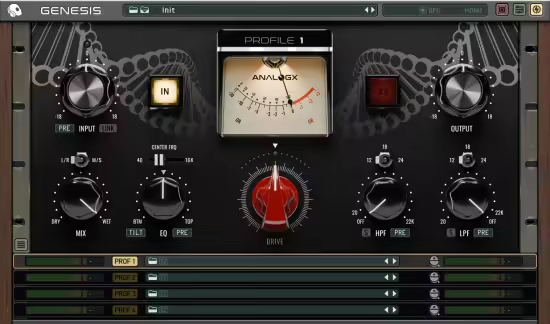
 正版资源
AnalogX Genesis Pro v2.2.4 [WiN, MacOSX]
AnalogX Genesis Pro v2.2.4 是一个基于 GPU 的模拟混音插件,也是 AnalogX 建模生态的核心宿主:它本身不绑定某一台硬件,而是把官方建模的复古调音台、压缩器、磁带机和前置放大器装进同一个容器,让每个扩展包在你的 DAW 里变成一台独立设备。对做电子音乐、混音和配乐的
网盘链接 · 支付成功后自动发货
永久有效 · 链接失效免费补发
每日 9:00-21:00 在线客服
AnalogX Genesis Pro v2.2.4 是一个基于 GPU 的模拟混音插件,也是 AnalogX 建模生态的核心宿主:它本身不绑定某一台硬件,而是把官方建模的复古调音台、压缩器、磁带机和前置放大器装进同一个容器,让每个扩展包在你的 DAW 里变成一台独立设备。对做电子音乐、混音和配乐的人来说,它的价值在于:不必为每一台“传奇硬件”单独挂一个高占用插件,也能在通道和总线上堆出成型的模拟染色。
GPU 上的 NAM 建模与 SSL、Neve、API 式调音台搭建
Genesis Pro 走神经网络建模路线,加载的是 AnalogX 的高品质模拟档案(NAM Profile)。官方给出的关键点是:数百个建模实例可同时运行,CPU 占用极低、延迟极低。这直接决定了它在工程里的用法——
- 适合在鼓组、贝斯、人声和总线上铺一层磁带式求和与前置放大,做出厚度和非线性压缩感,而不是靠单个饱和插件硬推。
- 可以按 SSL、Neve、API 的思路搭大型调音台结构,把每条通道的“推子味”做出来,再在总和链上叠磁带风格处理。
- 电子音乐里常见的长串处理(多轨饱和加总线胶水)在 GPU 上更容易保持实时,适合边写边听。
CPU 与 GPU 实例切换:录音、混音和渲染怎么排
插件支持一键在 CPU 与 GPU 实例之间切换,这是它在工作流上最实用的一点。可以按下面的方式安排:
- 录音和低延迟监听阶段走 CPU 实例,避免把实时输入押在 GPU 链路上。
- 进入混音后切到 GPU 实例,把神经网络运算交给显卡,腾出的 CPU 余量留给合成器、混响器和虚拟乐器。
- 整段会话的渲染同样由 GPU 承担,速度快,多次渲染之间的一致性也更容易保持。
放进工程时注意两点:一是建模链本身带非线性,通道叠加越多染色越重,建议先在小音量下对齐电平,再决定堆几层;二是 CPU 与 GPU 实例切换后要复核参数与延迟补偿,尤其是分轨已经做过自动化的时候。本次为 Team V.R 发布的 v2.2.4,WiN 版 191 MB,MAC 版 106 MB,两个平台分别打包。
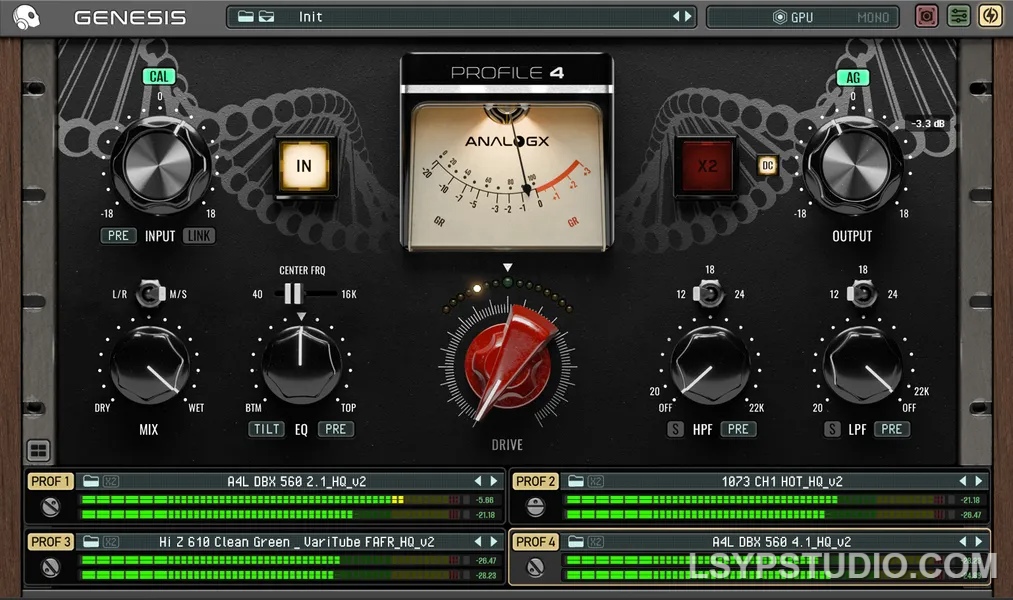
Team V.R | 03 November 2026 | WiN: 191 MB | MAC: 106 MB
全球首个基于 GPU 的模拟混音生态系统
AnaloqX Genesis——您工作室的核心
Genesis 不仅仅是一个插件,更是 AnaloqX 生态系统的核心。Genesis
专为我们的高品质建模系列而打造,能够提供传奇录音棚硬件的温暖、深度和非线性特性——从复古调音台和压缩器到磁带机和前置放大器,应有尽有。
有了 Genesis,每个扩展包都将成为您 DAW 中的全新设备。加载它,调整音色,让您的混音充满真实的模拟特性。GPU
混音为何改变一切?
升级到 GPU 不仅仅意味着性能的提升,更意味着无限的可能性。以下是基于 GPU 的 Genesis Pro 为您的工作流程带来的变革。
实时神经网络处理能力
以极低的 CPU 占用率和超低的延迟运行数百个 AnaloqX 的高品质模拟(NAM Profile)。
混合工作流程的自由
只需轻触按钮即可在 CPU 和 GPU 实例之间切换,在 CPU 上录音,在 GPU 上混音?——一切由您掌控!
模拟级混音:
构建庞大的、受 SSL、Neve 和 API 启发的调音台设置,并在您的 DAW 中即时使用磁带风格的求和链。
创意 CPU 余量:
让您的 CPU 轻松运行。让您的大型合成器、混响器和虚拟乐器流畅运行,而 GPU 则负责处理繁重的计算任务。
超快的渲染速度:
以极快的速度渲染整个神经网络会话,同时保持混音的一致性,并将等待时间降至最低。
系统要求硬件Mac
- 苹果芯片 M1 / M2 / M3 / M4 / M5(Pro / Max / Ultra)
- 最低16GB内存(建议32GB)
- macOS (13.0) 或更高版本
注意:在 macOS 系统下,Cubase 或 Nuendo 关闭 ASIO Guard 功能时,此功能不兼容。Windows系统支持的 GPU:NVIDIA
- RTX 2000 系列
- RTX 3000 系列
- RTX 4000 系列
- RTX 5000 系列
最低 8 GB 显存)AMD
- RX 6000系列
- RX 7000系列
- RX 9000系列
最低显存要求:8 GB 显存)驱动程序注意事项:请确保直接从制造商网站安装最新的 NVIDIA 或 AMD 官方驱动程序。不支持通过 Windows 更新提供的驱动程序。
更新日志 v2.2.4(自 v2.2.1 以来的更改)- 修复了重新打开项目后,GPU 实例无法传递音频,直到 GPU 关闭并重新打开的问题。 – 修复了在处理较小或不同缓冲区大小的宿主程序(尤其是 WaveLab)中,混合控制会导致干信号与湿信号不同步,从而在部分混合设置下出现梳状滤波现象的问题。- 修复了在某些情况下许可证会从计算机中移除,需要重新输入的问题。 – 修复了当配置文件位于云盘上但尚未下载时,配置文件加载会卡在“正在准备 GPU”界面,并且宿主程序会卡在退出界面的问题。插件现在会显示配置文件正在下载,或者显示配置文件离线不可用。
The World’s First GPU-Based Analog Mixing Ecosystem
AnalogX Genesis – The Heart of Your Studio
Genesis is more than just a plugin – it’s the core of the AnalogX ecosystem.
Built to power our High-Quality Modelling Tier, Genesis delivers the warmth, depth, and non-linear behaviour of legendary studio hardware – from vintage consoles and compressors to tape machines and preamps.
With Genesis, every expansion pack becomes a new piece of gear in your DAW. Load it, dial in the tone, and bring your mixes to life with authentic analog character.
Why GPU Mixing Changes Everything
The jump to GPU isn’t just about performance, it’s about possibilities. Here’s what a GPU based Genesis Pro unlocks in your workflow.
Real-Time Neural Power
Run hundreds of AnalogX’s high-quality emulations, or NAM Profiles with minimal CPU drag per instance and super low latency.
Hybrid Workflow Freedom
Switch between CPU and GPU instances at the touch of a button, track on CPU, mix on GPU? – you choose!
Analog-Scale Mixing
Build huge SSL, Neve, and API inspired console setups, complete with tape-style summing chains instantly available right inside your DAW.
Creative CPU Headroom
Let your CPU breathe. Keep your heavy synths, reverbs, and virtual instruments running flawlessly while the GPU handles the heavy lifting.
Super-Fast Bounce Times
Render entire neural sessions much faster with full mix consistency and minimal wait time.
System Requirements
Hardware
Mac
- Apple Silicon M1 / M2 / M3 / M4 / M5 (Pro / Max / Ultra)
- Minimum 16 GB RAM (32 GB Recommended)
- macOS (13.0) or later
Note: Not compatible with ASIO Guard OFF in Cubase or Nuendo on macOS.
Windows
Supported GPUs:
NVIDIA
- RTX 2000 Series
- RTX 3000 Series
- RTX 4000 Series
- RTX 5000 Series
Minimum 8 GB VRAM)
AMD
- RX 6000 Series
- RX 7000 Series
- RX 9000 Series
Minimum 8 GB VRAM)
Driver Notice
Please ensure the latest official NVIDIA or AMD drivers are installed directly from the manufacturer’s website.
Drivers supplied via Windows Update are not supported.
Changelog v2.2.4 (changes since v2.2.1)
– Fixed GPU instances passing no audio after reopening a project until the GPU was switched off and on again
– Fixed the Mix control putting the dry signal out of time with the wet signal in hosts that process in smaller or varying buffer sizes (notably WaveLab), which caused comb filtering at partial mix settings
– Fixed the license being removed from the computer in some situations, requiring it to be entered again
– Fixed profile loading getting stuck on “Preparing GPU”, and the host hanging on quit, when a profile is on a cloud drive and not downloaded. The plugin now shows that the profile is downloading, or that it isn’t available offline
同类资源
与当前资源同分类推荐 音频工具
Seedance2.0打造AI剧实战课
永久有效 · 网盘发货
 音频工具
【kpop新专辑】TWICE – THIS IS FOR- WORLD TOUR FINALE in SEOUL – LIVE《THIS IS FOR》世界巡演首尔终场
永久有效 · 网盘发货
 音频工具
顶级音效合集4600+种未来科幻武器开枪射击战斗音效素材合集,全部中文汉化Boom Library–Cyber W
永久有效 · 网盘发货
 音频工具
全网收藏播放量第一的助眠歌单,快速入睡告别失眠
永久有效 · 网盘发货
音频工具小洲·AI短片创作课
永久有效 · 网盘发货