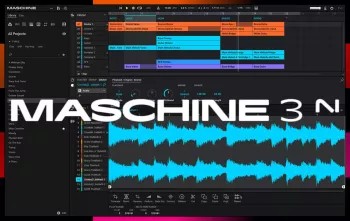
 正版资源
节奏工作站 Native Instruments Maschine 3 v3.7.2-bobdule [WiN]
Native Instruments Maschine 3 v3.7.2 是一个 Windows 平台的节奏工作站安装包(bobdule 打包,717 MB),用途很明确:把鼓机、采样器、编曲和演奏放在同一个环境里。它既能独立运行,也能作为插件挂在 DAW 中使用;音源可以是内置的虚拟乐器,也可以是
网盘链接 · 支付成功后自动发货
永久有效 · 链接失效免费补发
每日 9:00-21:00 在线客服
Native Instruments Maschine 3 v3.7.2 是一个 Windows 平台的节奏工作站安装包(bobdule 打包,717 MB),用途很明确:把鼓机、采样器、编曲和演奏放在同一个环境里。它既能独立运行,也能作为插件挂在 DAW 中使用;音源可以是内置的虚拟乐器,也可以是你自己导入的采样。对做电子、hip-hop、beat 类素材的制作人来说,它更像一个“先把律动敲出来”的工作台,而不是单纯加载音色的插件。
鼓合成器与无限编组:把鼓组当混音台来用
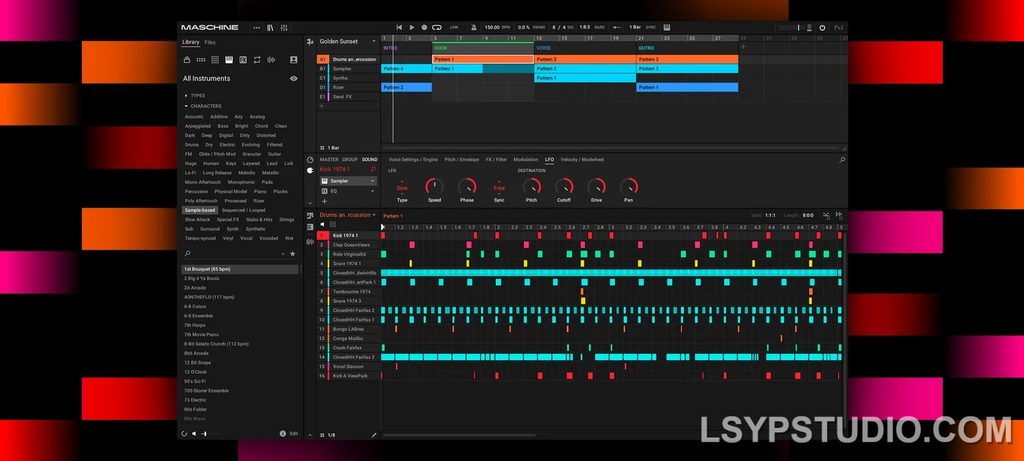
这一版是全面重做过的,重点在两处:鼓合成器和混音器。新的音频引擎允许添加不限数量的编组和插入效果,这意味着你可以给底鼓、军鼓、踩镲各开独立编组,逐条挂饱和、瞬态整形或滤波,而不必为了省资源把所有处理挤在总线上。做 techno、drum & bass 这类需要逐层塑形的鼓组时,这套结构比一次性堆在总线上的效果链更容易反复调整。
放进工程时有几点要注意。第一,编组和插入不限额,但 CPU 并不会因此免费,鼓组层数多的时候建议先固定下几个常用处理,再往上叠。第二,独立运行和插件模式下的路由逻辑不同,如果你打算最后在 DAW 里混音,最好一开始就决定是分轨导出还是直接在插件内完成编组,避免中途改结构。第三,接上 Maschine 硬件后它才真正变成演奏工具,纯鼠标操作只能用到一部分功能。
安装与采样库:补丁、XML 与重新扫描
安装流程是先运行原始安装程序,再应用补丁。过程中系统可能提示安装 2026 年 10 月 27 日版本的NativeAccess.xml;如果你手上已有更新的版本,就不必再装。运行不需要 RAS3 许可证。另一个常见问题是加载资源库时提示采样缺失,处理办法是清掉本地 Maschine 3 的数据库目录(位于用户目录下的 AppData\Local\Native Instruments\Maschine 3),然后重启软件让它重新扫描内容。另外,NI 更新了全部 Maschine 扩展包,改动只是补上 nicnt 文件以适配 Native Access,所以旧扩展包需要换成新版才能被正常识别。
整体上,这份资源适合已经习惯 Maschine 工作流、或者想从纯 DAW 编曲转向“先打鼓后编曲”的人。装之前建议先确认自己的扩展包来源,否则装完发现库是空的,排查起来比安装本身更花时间。
bobdule | 28 October 2026 | 717 MB
安装方法:
点击查看
运行原始安装程序,然后应用补丁。
如果系统提示安装 `NativeAccess.xml`(2026年10月27日版本),请按需操作;若你已有更新版本的文件,则无需安装。
若需激活新产品,可从以下网址获取更新的 XML 文件:
https://api.native-instruments.com/static/phints
无需 RAS3 许可证即可运行。
若在加载资源库(Library)时提示“采样缺失”(samples missing),请删除旧的数据库文件夹内容:
`C:\Users\用户名\AppData\Local\Native Instruments\Maschine 3`
随后在启动软件时,让其重新扫描内容即可。
NI 更新了所有 Maschine 扩展包(Expansions),仅增加了 nicnt 文件以适配 Native Access。
所有 Maschine 扩展包:
MASCHINE 3 旨在激发您的音乐灵感。从节拍制作、采样到编曲和演奏,它全程陪伴您。您可以将其与虚拟乐器或您自己的采样配合使用,既可独立运行,也可在 DAW 中使用。如果您准备更进一步,不妨使用 Maschine 硬件进行实战。
新版本经过全面重新设计,包括鼓合成器、混音器等。全新的音频引擎 MASCHINE 3 现在允许您添加无限数量的编组和插入效果,并拥有强大的功能集。多核支持确保您的计算机能够并行处理所有这些操作,即使将软件用作 VST 或 AU 插件模块,也能实现超高处理能力。新的音频引擎现在还支持侧链绑定,用于经典的闪避效果等等……
MASCHINE 是一个革命性的律动创作系统,它拥有触感十足的创意音色库,可轻松组织 Kontakt 8 或任何其他 VST、VSTi 音色库。
MASCHINE 搭配节拍创作软件,能够快速轻松地将软件的强大功能和灵活性与硬件的触感反馈完美结合。其基于模式的音序器、高性能采样器、丰富的专业工具和录音室效果器、卓越的鼓合成器以及 Kontakt 8 音色库,构成了一个完整的系统,助您快速专业地创作律动。
老款 MASCHINE 焕发新生
如果您仍在使用 MASCHINE 2.x,MASCHINE 3 软件更新将为您带来更强大的功能、更出色的音质和更强劲的现代音乐制作性能。经过全面重新设计,该软件提供了无数种全新方式来支持和加速您的创作灵感。该软件兼容所有版本的 MASCHINE 和 MASCHINE MIKRO*——可与您现有的硬件完美配合。继续阅读,了解更多详情……
重新设计的音频引擎
MASCHINE 3 的音频引擎在 MASCHINE 强大的功能集基础上,新增了无限的编组和插入效果。多核支持确保您的计算机能够以超高效的处理能力并行处理所有任务——即使您将软件用作 VST 或 AU 插件。全新的音频引擎现在还支持侧链,可实现经典的闪避效果等等。
鼓合成器
MASCHINE 3 为软件鼓合成树立了新的标杆。您可以创建自己完美调校的电子和原声鼓声,并获得真正无与伦比的音质。
六款独有的单音鼓插件,各自拥有独特的算法,可为您提供所需的任何打击乐音色。所有插件均可完全调节、自动化,并完美集成到 MASCHINE 中——品质源自 NI 备受赞誉的 DSP 专业技术。
混音器窗口
使用 MASCHINE 3 的混音器窗口,将您的音轨打磨至完美。轻松调整音量和声像。通过带有峰值指示器的电平表,清晰查看组和单个音轨的电平。调整任意声音组的电平。每个通道的两个辅助发送让您可以自由地将声音路由到项目中的任何位置。
MASCHINE 的全新用户界面为您带来这一切以及更多功能——前沿的律动制作从未如此简单。
全新插件条
MASCHINE 3 的全新插件条为您提供了一种全新的乐器和效果器视图。每个内置乐器和效果器现在都有自己的布局,可实现闪电般的视觉识别。这种直观的视觉集成也适用于 KOMPLETE 乐器和效果器。此外,MASCHINE 几乎可以处理您拥有的任何 VST、AU 或效果器插件。
更多内置音色
通过 MASCHINE 3 的全彩产品图标显示,您可以一目了然地浏览预设并加载任何 KOMPLETE 15 乐器或效果器。现在,还有更多精彩内容等待您去发现。 MASCHINE 3 包含 KOMPLETE 12 SELECT——精选 15 款 KOMPLETE 乐器和效果器。开箱即用,即可获得一整套专业音色,并可通过 MASCHINE 硬件进行全面控制。
此外,您还将获得 2000 多个采样、200 个全新的 MASSIVE 预设以及 100 多个全新套件——所有内容都集中在一个简洁的浏览器中,让您能够快速轻松地找到所需的音色。无论您想要什么样的音色,MASCHINE 都能满足您的需求。
发行说明
3.7.2 — 2026年10月27日
最低操作系统要求:- macOS 14、15、26;- Windows 10(最新 Service Pack)、Windows 11。
新增:支持 Massive XL。
MASCHINE 3 is all about getting your musical ideas flowing. It’s there every step of the way from beat making and sampling to arranging and performing your tracks. Use it with virtual instruments or your own samples, both on its own and in a DAW. And if you’re ready to take things up a gear, bring in Maschine hardware to get hands on.
The new version is completely redesigned, Drum Synths, mixer, etc. NEW audio engine sound engine MASCHINE 3 now allows you to add unlimited groups and inserts effects MASCHINE powerful set of features. Multicore support ensures that your computer will handle all this in parallel with the processing of ultra high – even when using the software as a VST or AU plug-in module. New audio engine now also supports side bindings for sidechaining, for classic ducking effects and more…
MASCHINE a revolutionary system for creating grooves tactile creative bit-making organization of recognized sound library Kontakt 8 any other VST, VSTi library.
Together with the software package for creating beats MASCHINE create quickly and easily combine the power and flexibility of software with tactile immediacy of hardware. His sequencer based on patterns, high-performance sampler, has an incredible set of professional tools and studio effects, exemplary drum synthesizers and library Kontakt 8 are you a complete system for quickly and professionally create grooves.
NEW JUICE FOR OLD MASCHINES
If you’re still using MASCHINE 2.x, the MASCHINE 3 software update can give you more functionality, sound, and raw power for modern music production. Completely reworked, the software offers countless new ways to support and fast-track your ideas. The software is compatible with all generations of MASCHINE and MASCHINE MIKRO* – it works with the hardware you already have. Read on for details on what you get…
REWORKED AUDIO ENGINE
MASCHINE 3’s audio engine adds unlimited groups and insert effects to MASCHINE’s powerful feature set. Multicore support ensures your computer handles it all in parallel with ultra-efficient processing – even when using the software as a VST or AU plug-in. The new audio engine now also supports sidechaining, for classic ducking effects and more.
DRUM SYNTHS
MASCHINE 3 sets a new benchmark in software drum synthesis. Create your own perfectly-tuned electronic and acoustic drum sounds in truly peerless sound quality.
Six exclusive monophonic drum plug-ins, with their own unique algorithms, give you any percussive sound you need. All fully tweakable, automatable, and perfectly integrated into MASCHINE – with the quality that comes from NI’s acclaimed DSP expertise.
MIXER WINDOW
Polish your tracks to perfection with the mixer window in MASCHINE 3. Tweak volume and panning with ultimate ease. See group and individual track levels clearly on meters complete with peak level indicators. Adjust levels on any group of sounds. And two aux sends per channel let you freely route sounds anywhere in your project.
MASCHINE’s new user interface brings you all this and much more – cutting-edge groove production has never been this easy.
NEW PLUG-IN STRIP
MASCHINE 3’s new plug-in strip gives you a whole new way of seeing your instruments and effects. Each internal instrument and effect now has its own layout for lightning fast visual recognition. This intuitive, visual integration extends to KOMPLETE Instruments and Effects. And beyond that, MASCHINE can handle pretty much any VST, AU or effect plug-in you own.
MORE SOUND INSIDE
Browse presets and load any KOMPLETE 15 Instrument or Effect at-a-glance directly from MASCHINE 3’s full-color product icon display. And now, there’s even more to discover. MASCHINE 3 includes KOMPLETE 12 SELECT – a premium selection of 15 KOMPLETE Instruments and Effects. Get a full suite of professional sound right out of the box and control it all from your MASCHINE hardware.
You also get over 2000 more samples, 200 brand-new MASSIVE presets, and over 100 new kits – all in a streamlined browser that makes finding your sound fast and simple. No matter what sound you’re after, MASCHINE is waiting for you.
Release Notes
Changelog:
3.7.0 — 2026-09-23
Minimum OS requirements: – MacOS 14, 15, 26. – Windows 10 (latest Service Pack), Windows 11.
ADDED Per-note probability
ADDED Variation page (Groove Section)
ADDED Euclidean & Random note generation modes
ADDED Hardware Controls for new features
IMPROVED Visualization of internal instruments shown below the mixer to support higher screen resolution
IMPROVED Visualization of internal effects to support higher screen resolution
IMPROVED Internal instruments and effects can be reordered via drag and drop
FIXED An issue where plugin names in the channel strip had a visual offset
3.7.2 — 2026-10-27
Minimum OS requirements: – MacOS 14, 15, 26. – Windows 10 (latest Service Pack), Windows 11.
ADDED Support for Massive XL
🏠 HomePage
同类资源
与当前资源同分类推荐 音频工具
Seedance2.0打造AI剧实战课
永久有效 · 网盘发货
 音频工具
【kpop新专辑】TWICE – THIS IS FOR- WORLD TOUR FINALE in SEOUL – LIVE《THIS IS FOR》世界巡演首尔终场
永久有效 · 网盘发货
 音频工具
顶级音效合集4600+种未来科幻武器开枪射击战斗音效素材合集,全部中文汉化Boom Library–Cyber W
永久有效 · 网盘发货
 音频工具
全网收藏播放量第一的助眠歌单,快速入睡告别失眠
永久有效 · 网盘发货
音频工具小洲·AI短片创作课
永久有效 · 网盘发货