 正版资源
响度压缩器 APU Software APU Loudness Compressor v4.6.1 [WiN, MacOSX]
资源下载 下载价格 2 积分 VIP免费 Team BTCR | 28 MB APU 响度压缩器(APU Loudness Compressor)是一款压缩 / 扩展器,专为支持现代响度标准(LUFS、真峰值,True Peak)设计。这意味着其压缩曲线以 LUFS 测量值为基准生成,而非均方根(R
网盘链接 · 支付成功后自动发货
永久有效 · 链接失效免费补发
每日 9:00-21:00 在线客服

Team BTCR | 28 MB
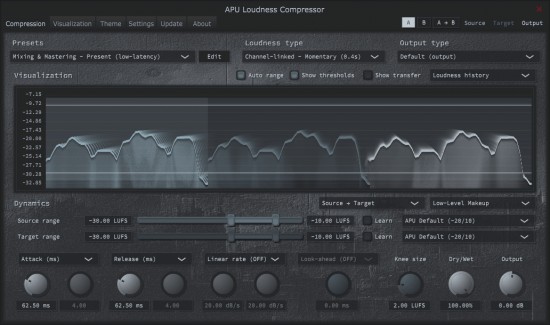
APU 响度压缩器(APU Loudness Compressor)是一款压缩 / 扩展器,专为支持现代响度标准(LUFS、真峰值,True Peak)设计。这意味着其压缩曲线以 LUFS 测量值为基准生成,而非均方根(RMS)或峰值(Peak)。由于 LUFS 是更精准的响度测量单位,因此该压缩器能实现高度透明的压缩效果,尤其适合母带处理与后期制作工作流程。
默认情况下,该压缩器不使用 “阈值 + 比率” 控制,而是通过 “源范围”(source range)与 “目标范围”(target range)进行操作。若你偏好传统控制方式,也可启用 “阈值 + 比率” 功能。压缩器动态控制区的右上角设有下拉菜单,可在这些操作模式与其他模式(如扩展器、限制器等)之间切换。
启用 “学习” 模式(learn mode)后,压缩器会自动调整源范围或目标范围,以匹配输入素材的特性。这种方式是上手使用该压缩器的便捷选择,也可作为后续精细调整的基础起点。
不妨试用一下,看看它是否符合你的工作流程需求。若你有任何疑问或反馈,可通过本网站的 “联系开发者”(Contact the Developer)入口随时沟通。
The APU Loudness Compressor is a compressor/expander designed to support modern loudness types (LUFS, True Peak). This means the compression curve is a function of LUFS measurements instead of RMS or Peak. Since LUFS is a more accurate measure of loudness, the result is very transparent compression, making it particularly well suited for mastering and post-production workflows.
By default, the compressor operates using a “source range” and “target range” in place of threshold + ratio controls. You can also enable the traditional threshold + ratio controls if you prefer. A drop-down menu located at the top-right of the compressor’s dynamics section allows switching between these modes of operation and others, such as expander, limiter, etc.
With “learn” mode enabled, the compressor will automatically adjust the source or target range to match the source material. This can be a great way to get started with the compressor and can be used as a starting point for further fine-tuning.
Check it out to see if it fits into your workflow. If you have any questions or feedback, don’t hesitate to reach out using the “Contact the Developer” beacon on this website.
同类资源
与当前资源同分类推荐 音频工具
Seedance2.0打造AI剧实战课
永久有效 · 网盘发货
 音频工具
【kpop新专辑】TWICE – THIS IS FOR- WORLD TOUR FINALE in SEOUL – LIVE《THIS IS FOR》世界巡演首尔终场
永久有效 · 网盘发货
 音频工具
顶级音效合集4600+种未来科幻武器开枪射击战斗音效素材合集,全部中文汉化Boom Library–Cyber W
永久有效 · 网盘发货
 音频工具
全网收藏播放量第一的助眠歌单,快速入睡告别失眠
永久有效 · 网盘发货
音频工具小洲·AI短片创作课
永久有效 · 网盘发货