 正版资源
人声矫正修音工具Vovious – DoublePi Vovious v1.0.6 for WiN
目录 资源目录 8 条 下载 DoublePi Technologies – Vovious v1.0.6 – 独立版、VST3、AAX x64 [2026年1月2日](VR) 原出版商:Vovious 版本:v1.0.6 格式:VST3、AAX、独立运行 类别:VST插件 系统要求:Windows
网盘链接 · 支付成功后自动发货
永久有效 · 链接失效免费补发
每日 9:00-21:00 在线客服

目录
资源目录8 条
- 下载 DoublePi Technologies – Vovious v1.0.6 – 独立版、VST3、AAX x64 [2026年1月2日](VR)
- 原出版商:Vovious
- 版本:v1.0.6
- 格式:VST3、AAX、独立运行
- 类别:VST插件
- 系统要求:Windows 10 或更高版本
- 许可证类型:完整版
- 下载大小:13.9 MB
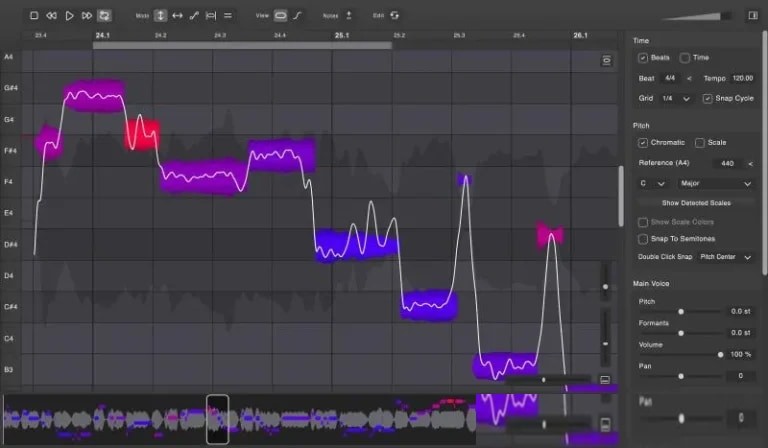
Vovious 的基本工具提供了用于改变音高、斜率、颤音、共振峰和音符振幅的高级控制功能。
- 音高绘制:打击垫绘制模式允许您在打击垫上绘制任何内容。
- 临时备注:临时备注允许您轻松进行细微的更改。您可以指定开始时间和结束时间。
- 节奏:编辑歌曲节奏时,垂直线的颜色表示音符与节拍的关系。
- 齿音编辑: Vovious 允许您编辑齿音、噪声和呼吸声的幅度(波形上的暗区表示)。
ARA插件扩展
在兼容 ARA 的 DAW 中,Vovious 可以即时接收您的人声轨道,并跟踪 DAW 中片段的更改。甚至连走带、循环、节奏和速度的更改都会同步。
标尺检测
Vovious 会自动检测您人声录音的调性。您可以使用此调性调整音符,还可以选择显示相应的颜色。
MIDI参考调音
如果您已有 MIDI 格式的人声旋律,只需将 MIDI 文件拖放到 Vovious 中即可导入。现在,您可以参考此旋律来调整音符。
撤销/重做菜单
“撤销/重做”菜单允许您逐步执行编辑操作,并一次性撤销/重做多个操作。结合循环播放功能,您可以轻松比较编辑前后的声音。
多轨编辑
Vovious 允许您在单个窗口中编辑多个音轨。您可以使用 TrackSwitcher 在音轨之间切换。其他音轨可以通过 DAW 中的音轨颜色显示为参考。这些颜色可以帮助您了解哪些音符属于哪个音轨。
神经网络音高检测
精准的音高检测是完美人声调音的关键。Vovious 采用先进的神经网络技术,无需使用云服务即可实现最佳效果。所有计算均在您的计算机上完成并保存。
日夜工作流程
您可以随时轻松调节 Vovious 用户界面的亮度,以满足您的需求。还有一个贴心的功能:通过调节亮度,您可以将 Vovious 的配色方案与您的 DAW 相匹配。
Vovious’s Essential Tools provide advanced controls for changing pitch, slope, vibrato, formants, and note amplitude.
- Pitch Drawing: Pad drawing mode lets you draw anything on the pad.
- Temporary Note: Temporary Notes allow you to easily make micro-level changes. You specify the start and end.
- Timing: When editing song timing, the colors of the vertical lines show how notes relate to the beat.
- Sising Editing: Vovious lets you edit the amplitude of sibilants, noise, and breaths (indicated by dark areas on the waveform).
ARA Plugin Extension
In an ARA-compatible DAW, Vovious instantly receives your vocal track and tracks changes to clips in your DAW. Even changes in transport, loop, rhythm, and tempo are synchronized.
Scale Detection
Vovious automatically detects the key of your vocal recording. You can use this key to adjust notes and, optionally, display the corresponding colors.
MIDI Reference Tuning
If you already have a vocal melody in MIDI format, you can import it by simply dragging and dropping the MIDI file into Vovious. Now you can use this reference to adjust notes.
Undo/Redo Menu
The Undo/Redo menu allows you to step through edits and undo/redo multiple actions at once. When combined with Loop, you can easily compare the sound before and after editing.
Multi-Track Editing
Vovious allows you to edit multiple tracks in a single window. You can switch between tracks using TrackSwitcher. Other tracks can be displayed as a reference using the track color in your DAW. The colors help you understand which notes belong to which track.
Neural Network Pitch Detection
Accurate pitch detection is essential for perfect vocal tuning. Vovious uses advanced neural network technology to achieve the best results without the use of cloud services. All calculations are performed on your computer and remain there.
Workflow Day and Night
You can easily adjust the brightness of Vovious’s user interface to suit your needs at any time of day. A nice bonus: by adjusting the brightness, you can match Vovious to the color scheme of your DAW.
同类资源
与当前资源同分类推荐 效果插件
失真插件 Heavyocity FURY Distortion Designer v1.1.3 Mac
永久有效 · 网盘发货
 效果插件
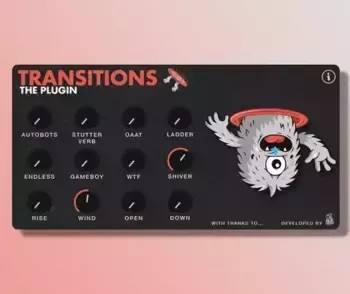
转场效果插件 Mors Transitions Plugin WiN MacOSX Max 4 Live
永久有效 · 网盘发货
 效果插件
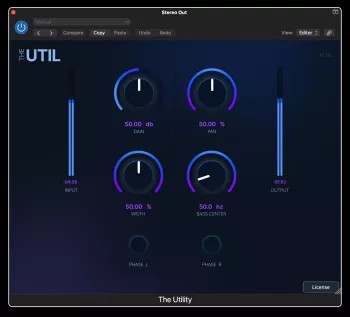
全能混音实用工具 – Cr8ive Audio The Util v1.0.0 macOS
永久有效 · 网盘发货
 效果插件
[多模式动态均衡与综合染色效果器] Orra Audio Orra EQ v1.3.0
永久有效 · 网盘发货
 效果插件
签名款软件效果器 Neural DSP Archetype Mateus Asato v1.1.0
永久有效 · 网盘发货