 正版资源
Apple Logic Pro v12.2 U2B [MacOSX]
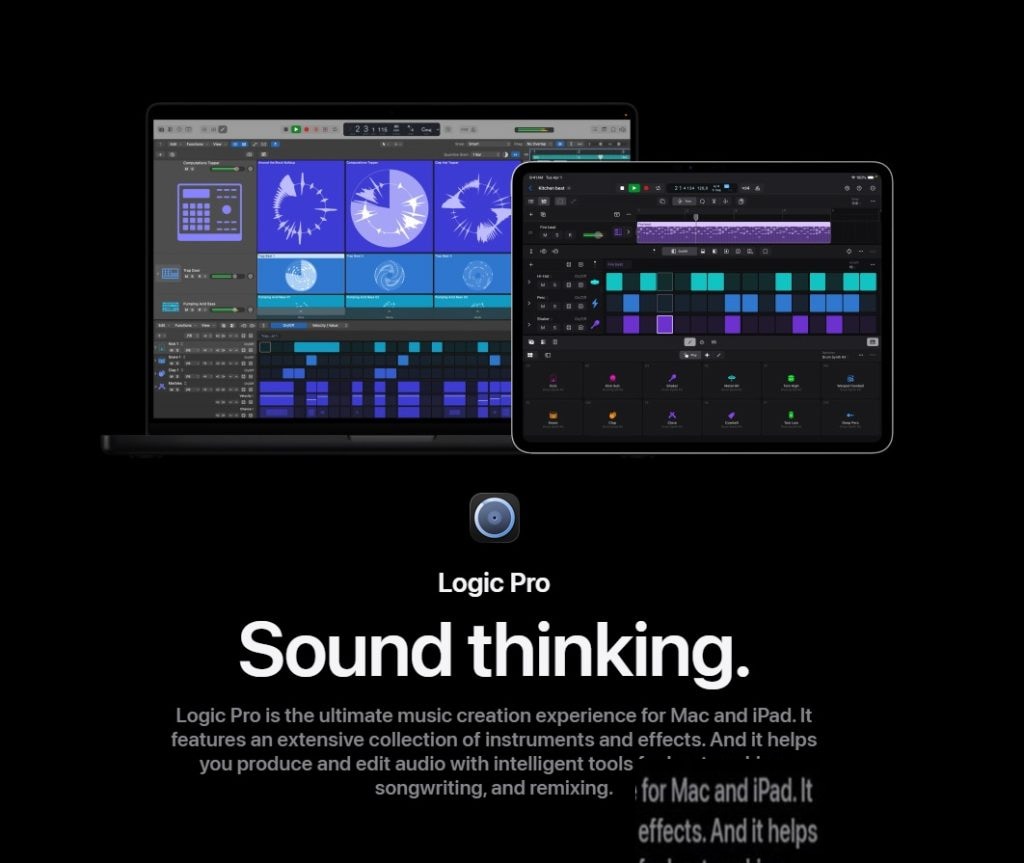
Logic Pro 12(MacOSX,1.47 GB 安装包)是苹果的编曲宿主,把录音、编辑、混音和声音设计收在同一个工程里。对做电子音乐、混音和配乐的人来说,它的价值很具体:不必在几个软件之间来回导出,写和弦、搭鼓组、修人声、渲染效果都能在同一条时间线上完成。12 版在原有工具之外加入了 AI
网盘链接 · 支付成功后自动发货
永久有效 · 链接失效免费补发
每日 9:00-21:00 在线客服
Logic Pro 12(MacOSX,1.47 GB 安装包)是苹果的编曲宿主,把录音、编辑、混音和声音设计收在同一个工程里。对做电子音乐、混音和配乐的人来说,它的价值很具体:不必在几个软件之间来回导出,写和弦、搭鼓组、修人声、渲染效果都能在同一条时间线上完成。12 版在原有工具之外加入了 AI 辅助,可生成和弦进行、贝斯线、旋律与节奏灵感,同时保留手动修改的余地。
轨道堆栈与智能控制:分层音色和插件参数的收拢方式
做电子音乐最常见的麻烦是叠层:一个主音可能要叠三四轨合成器,一段配乐可能同时挂着弦乐、纹理和打击层,轨道一多,编曲过程中的滚动和查找就很费时间。轨道堆栈可以把多轨打包成一个可折叠的整体,分层的乐器当一轨来管理。智能控制则把多个插件的参数映射到同一页旋钮上,滤波扫频、加混响量、调失真度这些动作可以一起推,不用逐个开插件窗口。快速滑动合成能把多次录制整理到文件夹里,挑出可用的片段;区域和曲目的播放列表可以存多套编辑版本,用曲目切换在版本之间对比。
Flex Pitch、Step Sequencer 与 Alchemy 的分工
这套工具大致分三块用。Flex Pitch 负责修正人声不准的地方,也能改录好的旋律走向,适合人声切片和需要微调音高的素材;Flex Time 用来控制录音的时值与速度。节拍方面,Drummer 提供可直接编排的鼓轨,Step Sequencer 适合做重复性的电子节奏型,Drum Machine Designer 用来搭建自定义鼓组。音色设计交给 Alchemy 和 Sampler,配上各类专业效果器。另外,基于选择的处理可以把任意音频效果器组合直接渲染到选定的音频文件上,把效果“打印”成音频再切片,是电子音乐里很顺手的一步。
放进工程时有两点值得留意:AI 生成的和弦与贝斯线更适合当起点,直接铺满整首容易撞上通用套路,建议改掉节奏位置或替换音色;基于选择的处理属于渲染式操作,动手前先在播放列表里留一份原始区域,方便回退对比。

P2P | 10 April 2026 | 1.47 GB
Loqic Pro 12 是 Loqic 的最新版本。它将强大的专业音乐制作、音频处理和混音工具集成到一个现代化的界面中,无论身在何处,都能快速获得高质量的成果,并轻松上手。Loqic Pro 12 包含海量的乐器、效果器和循环乐段,满足您创作优秀作品的一切需求。Loqic
Pro 12 引入了 AI 辅助工具,可帮助您生成和弦进行、贝斯线、旋律和节奏灵感,同时让您完全掌控创作过程。使用轨道堆叠、智能控制和高级 MIDI 工具快速录制演奏,然后使用 Flex Time 和 Flex Pitch 塑造音频。使用 Drummer、Step Seguencer 和 Drum Machine Desiqner 构建节拍,并使用 Alchemy、Sampler 和各种专业效果器设计声音。
强大的界面
- 使用轨道堆栈对多个轨道进行分组和管理,并创建复杂的、分层的乐器。
- 使用智能控制,一键管理多个插件和参数。
- 使用 MacBook Pro 上的触控栏的直观控件,创建、编辑和浏览作品。
专业音乐制作
- 使用快速滑动合成功能,将素材整理到文件夹中,轻松创建合辑。
- 创建区域和曲目编辑的新播放列表,并使用曲目切换功能在它们之间切换。
- 使用基于选择的处理方式,将任意音频效果插件组合渲染到选定的音频文件。
- 使用 Flex Pitch 功能纠正人声部分的不准确之处,并改变录制曲目的旋律。
- 使用 Flex Time 可以轻松控制任何录音的拍号和速度。
- 对某个区域或音轨的一部分使用混音参数和插件的完全自动化控制。
- 使用 iPad 或 iPhone 上的 Loqic Remote,即可在房间的任何位置创作和混音音乐。
打击乐器
- 使用 Drummer(一款虚拟录音鼓手和节拍生成器),创建逼真的鼓声——无论是原声、电子还是嘻哈风格。
- 从 28 位鼓手中进行选择,他们负责设定节奏并演奏数百万种独特的变奏。
- 使用鼓组设计器功能,利用一系列精心采样的鼓组,设计您自己的鼓组。
- 使用鼓机设计器改变电子节奏的声音。
键盘和合成器
- 从种类繁多的合成器中汲取灵感——模拟合成器、波形合成器、运算合成器、加法合成器、颗粒合成器、频谱合成器和物理合成器。
- 使用功能强大的 Alchemy 采样合成器,轻松查找声音或创建新的声音。
- 使用各种采样乐器或使用 EXS24 采样器创建新的乐器。
- 利用琶音器功能,瞬间将简单的和弦转化为丰富的和声。
吉他和贝斯设备
- 使用 Amp Desiqner,您可以创建自己的吉他和贝斯配置,使用经典和现代的放大器、硬件系统和麦克风。
- 从延迟、失真、调制等效果器中创建您自己的效果器板踏板组合。
原声效果
- 使用 Space Desiqner 的卷积混响,在逼真的声学空间中演奏您的作品。
- 使用复古磁带、多抽头和立体声延迟效果。
声音库
- 超过 2800 种乐器和音效音色。
- 1000 件精心挑选的乐器样本。
- 超过 7,000 个涵盖各种类型的 Apple Loops。
兼容性
- 使用兼容的第三方 Audoi Unit 插件扩展您的乐器和效果器库。
- 使用 GaraqeBand 导出功能,通过 iCloud 从 iPhone 或 iPad 远程向 Loqic 项目添加新音轨。
- 导入和导出 XML 文件以支持 Final Cut Pro X 工作流程。
- 打开在 Loqic 5 或更高版本中创建的项目。
系统要求:
搭载 Apple Silicon 芯片(Intel 处理器,AI 功能有限)的 Mac;
macOS 14.4 或更高版本(推荐 15.6);
最小安装至少需要 6 GB 可用存储空间,完整音效库推荐使用 72 GB 至 75 GB 存储空间;
最低 8 GB 内存,但强烈建议使用 16 GB 或以上以获得流畅性能;
需要 64 位 Audoi Unit 插件。
Logic Pro 12 is the most advanced version of Logic. Powerful tools for professional music production, audio processing, and mixing are built into a modern interface for fast, high-quality results and ease of use – no matter where you are. Logic Pro 12 includes a huge collection of musical instruments, effects, and loops – everything you need to create great compositions.
Logic Pro 12 introduces AI-assisted tools that help generate chord progressions, basslines, melodies, and rhythmic ideas while keeping you in full creative control. Capture performances quickly with Track Stacks, Smart Controls, and advanced MIDI tools, then shape audio with Flex Time and Flex Pitch. Build beats using Drummer, Step Sequencer, and Drum Machine Designer, and design sounds with Alchemy, Sampler, and a wide range of professional effects.
Powerful interface
- Group and manage multiple tracks and create complex, layered instruments with Track Stacks.
- Manage multiple plugins and parameters with a single touch using Smart Controls.
- Create, edit, and navigate compositions using the intuitive controls of the Touch Bar on your MacBook Pro.
Professional music production
- Organize takes into folders and easily create compilations with Quick Swipe Comping.
- Create new playlists of regions and track edits and switch between them using the Track Alternatives feature.
- Render any combination of audio effect plug-ins to selected audio files using Selection-based Processing.
- Correct inaccuracies in vocal parts and change the melodies of recorded tracks with the Flex Pitch feature.
- Easily control the time signature and tempo of any recording with Flex Time.
- Use full automation of mixing parameters and plugins for a portion of a region or track.
- Compose and mix music from anywhere in the room with Logic Remote on iPad or iPhone.
Percussion instruments
- Create realistic drum tracks – acoustic, electronic, or hip-hop – with Drummer, a virtual session drummer and beat generator.
- Choose from 28 drummers who set the rhythm and perform millions of unique variations.
- Design your own drum kits with the Drum Kit Designer feature, using a collection of carefully sampled drums.
- Change the sound of electronic rhythms with Drum Machine Designer.
Keyboards and synthesizers
- Get inspired by an impressive selection of synthesizers – analog, waveform, operator, additive, granular, spectral and physical.
- Easily find sounds or create new ones with the amazing Alchemy sampler synthesizer.
- Use a variety of sampled instruments or create new ones with the EXS24 Sampler.
- Instantly transform simple chords into rich harmonies with the Arpeggiator feature.
Guitar and bass guitar equipment
- Create your own guitar and bass setups with Amp Designer, using classic and modern amps, hardware systems, and microphones.
- Create your own Pedalboard pedal set from a collection of effects such as delay, distortion, modulation.
Original sound effects
- Perform your compositions in realistic acoustic spaces with Space Designer’s convolution reverb.
- Use vintage tape, multi-tap and stereo delay effects.
Sound Library
- Over 2800 instrument and sound effect patches.
- 1000 carefully sampled instruments.
- Over 7,000 Apple Loops across a wide variety of genres.
Compatibility
- Expand your library of instruments and effects with compatible third-party Audio Unit plug-ins.
- Remotely add new tracks to your Logic project from your iPhone or iPad via iCloud using the GarageBand export feature.
- Import and export XML files to support Final Cut Pro X workflows.
- Open projects created in Logic 5 or later.
Requirements
Mac with Apple Silicon (Intel with limited AI features)
MacOS 14.4 or later (15.6 recommended)
At least 6 GB of available storage for a minimum install, with 72 GB to 75 GB recommended for the full Sound Library.
While 8GB RAM is the minimum, 16GB or more is highly recommended for smooth performance.
64-bit Audio Unit plugins required.
同类资源
与当前资源同分类推荐 编曲宿主
Cubase Pro v12.0.20-V.R MAC
永久有效 · 网盘发货
 编曲宿主
Cubase12最新完整版 – Cubase软件完整版音色库【不包含软件】[Windows]
永久有效 · 网盘发货
 编曲宿主
Ableton Live 11软件最新版![Win-Mac] 电子音乐制作必备软件Ableton Live 11最新版v11.3.13 支持中英文完整功能版 [支持M1M2]
永久有效 · 网盘发货
 编曲宿主
音乐制作宿主软件 Steinberg Cubase Pro 15 v15.0.5 R2R U2B
永久有效 · 网盘发货
 编曲宿主
音乐制作宿主软件 Steinberg Cubase Pro 14 Mac (一键安装版)
永久有效 · 网盘发货