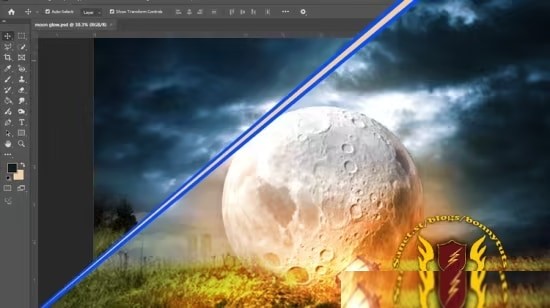
 正版资源
专为零基础小白与进阶学员打造的 Adobe Photoshop 全能大师课Adobe Photoshop Masterclass: Beginner to Advanced
《Adobe Photoshop Masterclass: Beginner to Advanced》由 Krishna Kumar Verma 讲解,共 7 节课、总时长 2 小时 7 分,英文授课,视频为 1920×1080 的 h264,音频 AAC 44.1 kHz 立体声,整包约 3.2
网盘链接 · 支付成功后自动发货
永久有效 · 链接失效免费补发
每日 9:00-21:00 在线客服
《Adobe Photoshop Masterclass: Beginner to Advanced》由 Krishna Kumar Verma 讲解,共 7 节课、总时长 2 小时 7 分,英文授课,视频为 1920×1080 的 h264,音频 AAC 44.1 kHz 立体声,整包约 3.2 GB。对做电子音乐的人来说,它管的是声音之外的视觉部分:单曲封面、合辑视觉、发行页横幅、视频缩略图、社媒方图。这些以前要靠设计朋友或套模板的东西,现在可以自己在工程间隙做完。课程标注难度为 Expert,内容却从界面布局与工具箱讲起,属于零基础能跟、进阶能补的跨度。
图层、蒙版与选区:把一张封面拆成能改的层
课程把图层、蒙版和调整图层作为一条主线,并单独讲了干净精准的选区与背景替换。对音乐视觉最实际的价值是留退路:标题文字、艺人名、底图、纹理各占一层,蒙版控制显隐,调整图层统一色调;改发行日期或换主视觉时,不用整张重做。抠图部分用来处理素材照片、扫描的实体物料或艺人自拍,把主体从杂乱背景里取出来再拼进画面。建议直接拿自己下一张发行的封面当练习文件,比跟着示例图更省事,也更清楚哪些层该留。
人像精修与多图层光影合成:海报、Banner 与缩略图
后半段进入人像精修、多图层光影合成与色彩修饰,并用自媒体封面、商业海报、电商 Banner 三类项目做演练,滤镜与混合模式也在其中。这几类尺寸恰好对应发行平台的方图与横幅、视频缩略图和演出海报。多图层合成的思路可以直接迁移到封面拼贴:光效、噪点、渐变分层叠加,用混合模式调通透度,而不是在一张图上反复涂抹。英文讲解术语较密,遇到精修和合成段落建议放慢速度跟做;7 节课能在一两个晚上过完,但真正吃透还得自己再练几遍。

Published 6/2026
Created by Krishna Kumar Verma
MP4 | Video: h264, 1920×1080 | Audio: AAC, 44.1 KHz, 2 Ch
Level: Expert | Genre: eLearning | Language: English | Duration: 7 Lectures ( 2h 7m ) | Size: 3.2 GB
这是一门专为零基础小白与进阶学员打造的Adobe Photoshop 全能大师课。课程采用“全流程拆解”与“实战驱动”的教学模式,带你从最基本的界面布局、工具箱使用及核心的图层与蒙版逻辑学起,迅速打破对专业软件的恐惧感。随后,课程将深入攻克核心的高级技能,包括干净精准的智能抠图与背景更换、无损商业级人像精修与微调,以及极具创意的多图层光影合成与色彩修饰。通过大量针对自媒体封面、商业海报和电商 Banner 的实战项目演练,你不仅能彻底掌握滤镜、混合模式等核心设计技法,更能在结课时独立交付符合行业出版与网络传播标准的商业级视觉作品,真正实现从软件新手到创意视觉专家的蜕变。
从零开始学习 Adobe Photoshop,掌握照片编辑、修饰和创意照片处理项目。
您将学到什么
⚡ 精通 Adobe Photoshop 界面和基本工具。使用 Photoshop 专业地编辑和增强照片。
⚡ 通过干净精准的选区移除和替换背景。运用高级技巧修饰人像并提升图像质量。
⚡ 自信地使用图层、蒙版和调整图层。创建专业的社交媒体帖子、横幅、海报和缩略图。
⚡ 应用滤镜、特效和混合模式进行创意设计。为个人和商业项目设计引人注目的图形。正确导出文件。
要求
❗无需任何 Photoshop 使用经验。一台电脑或笔记本电脑(Windows 或 Mac 系统均可)。❗
设备上已安装 Adobe Photoshop。具备基本的电脑知识会有帮助,但并非必需。❗
愿意通过实践项目学习和练习。❗
需要网络连接以下载课程资源和更新。
简介
欢迎来到 Adobe Photoshop 大师班——掌握照片编辑、图形设计和创意照片处理的完整指南!
本课程专为零基础学员以及希望从零开始构建扎实Photoshop技能的中级学习者而设计。您将从Photoshop的基础知识入手,逐步深入到高级编辑、修图和专业级照片处理项目。
在本课程中,你将参与真实世界的项目,帮助你了解专业人士如何创作在社交媒体、广告和创意产业中使用的精美视觉效果。
您将以简单易懂的方式学习循序渐进的技巧,即使您以前从未使用过 Photoshop,也能轻松上手。
本课程你将学到什么
✨ 完整的 Photoshop 界面和必备工具
✨ 专业照片编辑和修图技巧
✨ 背景移除和对象选择方法
✨ 使用图层、蒙版和混合模式
✨ 色彩校正和高级调色
✨ 创建社交媒体帖子、海报和缩略图
✨ 逼真的照片处理和合成
✨ 灯光、阴影和电影特效
✨ 导出文件,适用于网页、印刷和数字用途
完成本课程后,您将能够自信地使用 Adobe Photoshop 进行个人项目、自由职业或专业设计工作。
无论你是想成为平面设计师、照片编辑、自由职业者还是内容创作者,本课程都将帮助你打下坚实的 Photoshop 基础,并掌握高级技能。
本课程适合以下人群:
⭐ 完全零基础,想要从零开始学习 Adobe Photoshop 的初学者。对平面设计和照片编辑感兴趣的学生。⭐
希望制作专业缩略图和社交媒体图片的创作者。希望提升和修饰照片的摄影师。⭐
希望提供 Photoshop 编辑和设计服务的自由职业者。⭐
希望创建自己的营销材料的小企业主。任何想要提升创意和数字设计技能的人。
Learn Adobe Photoshop from scratch and master photo editing, retouching, and creative photo manipulation projects.
What you’ll learn
⚡ Master the Adobe Photoshop interface and essential tools. Edit and enhance photos professionally using Photoshop.
⚡ Remove and replace backgrounds with clean and accurate selections. Retouch portraits and improve image quality using advanced techniques.
⚡ Work confidently with layers, masks, and adjustment layers. Create professional social media posts, banners, posters, and thumbnails.
⚡ Apply filters, effects, and blending modes for creative designs. Design eye-catching graphics for personal and commercial projects. Export files correctly for w
Requirements
❗ No prior Photoshop experience is required. A computer or laptop (Windows or Mac).
❗ Adobe Photoshop installed on your device. Basic computer knowledge is helpful but not necessary.
❗ Willingness to learn and practice through hands-on projects.
❗ Internet connection for downloading course resources and updates.
Description
Welcome to the Adobe Photoshop Masterclass – your complete guide to mastering photo editing, graphic design, and creative photo manipulation!
This course is designed for complete beginners as well as intermediate learners who want to build strong Photoshop skills from scratch. You will start with the basics of Photoshop and gradually move toward advanced editing, retouching, and professional-level photo manipulation projects.
Throughout this course, you will work on real-world projects that help you understand how professionals create stunning visuals used in social media, advertising, and creative industries.
You will learn step-by-step techniques in a simple and easy-to-follow manner, making it perfect even if you have never used Photoshop before.
What you will learn in this course
✨ Complete Photoshop interface and essential tools
✨ Professional photo editing and retouching techniques
✨ Background removal and object selection methods
✨ Working with layers, masks, and blending modes
✨ Color correction and advanced color grading
✨ Creating social media posts, posters, and thumbnails
✨ Realistic photo manipulation and compositing
✨ Lighting, shadows, and cinematic effects
✨ Exporting files for web, print, and digital use
By the end of this course, you will be confident in using Adobe Photoshop for personal projects, freelance work, or professional design jobs.
Whether you want to become a graphic designer, photo editor, freelancer, or content creator, this course will help you build a strong foundation and advanced skills in Photoshop.
Who this course is for
⭐ Complete beginners who want to learn Adobe Photoshop from scratch. Students interested in graphic design and photo editing.
⭐ Content creators who want to create professional thumbnails and social media graphics. Photographers looking to enhance and retouch their photos.
⭐ Freelancers who want to offer Photoshop editing and design services.
⭐ Small business owners who want to create their own marketing materials. Anyone who wants to improve their creative and digital design skills.
同类资源
与当前资源同分类推荐 音乐教程
Melodic Dubstep风格音乐制作教程 【How To Make Melodic Dubstep with CRaymak】
永久有效 · 网盘发货
 音乐教程
英国低音音效设计大师班深度教程 Longstoryshort
永久有效 · 网盘发货
 音乐教程
赵心纯《 趋势班课程讲解》
永久有效 · 网盘发货
 音乐教程
🎵 B站 - 全能音乐人入门训练营:零基础学写歌
永久有效 · 网盘发货
 音乐教程
高画质指弹教程Truefire The Celtic Songbook TUTORiAL-FANTASTiC
永久有效 · 网盘发货